2010年10月25日 星期一

協作平台

使用Google Sites 架設網站,主題可以環繞你所參加的社團, 你的家鄉或社區, 你的分享與關心, 你的朋友, 高中同學, 電影, 音樂, 學業, 生涯,

評分標準

  • 創新(20%)
  • 資訊完整性 (30%)
  • 美學 (25%)
  • 網站邏輯架構 (15%)
  • 線上服務功能 (10%)
雛型(半成品),網站建議書(範本)繳交日期 10/25/2010
成品繳交日期 11/01/2010
-----------------------------------------------------------------------------


我的天空網站建議書草案
25.10.2010

定位
讓我周遭的朋友、同學能夠對我有更進一步的認識。
也能將我所學習的東西,運用在生活上,幫助大家。

目標
1.與朋友、同學分享我的生活點滴。
2.讓中原大學的同學能位自己權益發聲。


背景
科技日益發達,部落格已是大眾互動最重要的平台,但太多部落格不免讓人覺得煩雜,因此建立一個整合平台,將個人擁有的網路資源放在一個網站上,更利於他人認識自己,也能幫助同學免於學生權益受損。

功能
1.認識:讓大家認識我參與的社團、組織、生活。
2.連結:將分散於網路各地,跟我有關的網站,蒐集起來。
3.搜尋:可利用搜尋功能,搜尋站內站外的資訊。
4.幫助:藉由現在參與的組織,幫助同學捍衛自身的學生權益。
5.宣傳:讓我的家鄉、我的社團、我的組織能更廣為人知。

雛型:我的天空

Lab 23 Making web pages accessible

1. Use Firefox Accessibility Extension to identify the accessibility failures and warnings in http://google.com
2. Fix the failures you found.


使用 Firefox Accessibility Extension 看 google首頁的結果


將google首頁存檔,使用kompozer-0.7.10-win32編輯


開啟存檔後的google網頁,再執行 Firefox Accessibility 


Extension 可以看到


比較編輯前後,可以看到Fail消失了。

Lab 22 Firefox Accessibility Extension

Use Firefox Accessibility Extension to check the accessibility of three sites that you visit most.
Report the summary of all the errors and warnings for each site.


自動控制社協作平台


雅虎奇摩
中原大學

2010年10月18日 星期一

Lab 21: Making images accessible

1. Study what an ALT tag is.

2. Use KompoZer to edit the following homepage
at http://bloggercamp.blogspot.com/2007/01/2007.html

You can copy and paste the content to your KompoZer.


3. Save your editings and preview your webpage using Firefox

4. Make the webpage accessible by
adding ALT text to the images.
執行kompozer.exe
載入http://bloggercamp.blogspot.com/2007/01/2007.html
在source裡面的alt="加入文字"


5. Go to the Firefox Add-ons site for Firefox Accessibility Extension
6. Click the "Install now" button on the add-ons website
下載  Firefox Add-ons site for Firefox Accessibility Extension

7. Check whether you can see the ALT text for the images by selecting the "Show Text Equivalent" function.
使用Show Text Equivalent" function
 使用Show Text Equivalent" function
 發現圖不見了,只剩下文字。

Lab 20 More on HTML

Headings
1. Copy and paste the Headings example athttp://www.w3schools.com/html/html_primary.asp

2. Enter http://www.w3schools.com/html/tryit.asp?filename=tryhtml_basic
3. What kind of effects can you see?

h1~h6代表的字體大小,本圖是由h1寫到h6,字體大小由大變化到小。


Lists
4. Copy and paste the Headings example athttp://www.w3schools.com/html/html_lists.asp

5. Enter http://www.w3schools.com/html/tryit.asp?filename=tryhtml_basic
6. What kind of effects can you see?

目前看到有3種list,分別為HTML Unordered Lists、HTML Ordered Lists、

HTML Definition Lists。


Lab 19 HTML

Preparation

1. Using Microsoft Notepad, Copy and paste the HTML example atIntroduction to HTML


2. Save the file as myfile.html


3. Open the file using Firefox.


New editor
4. Enter http://www.w3schools.com/html/tryit.asp?filename=tryhtml_basic
到網頁編輯自己的HTML。

5. Copy and paste the HTML example at Introduction to HTML
將內容複製到記事本內。
 將檔案另文存為.html檔,並按右鍵點選內容,將其改成使用firefix開啟。

6. Verify your results on the screen.
 雙擊該檔,就可以看到成果囉^^


Lab 18 Comparing browsers

Install Google Browser Google Chrome and Firefox 3.0, try a few websites and compare their performance. For example, youtube, blogspot, msn, and yahoo.
先下載 Google Chrome 和  Firefox 3.0


網路爬文一下,找到了一篇這樣的文章:Google Chrome執行速度快?到底有多快?寫程式來比較看看囉~

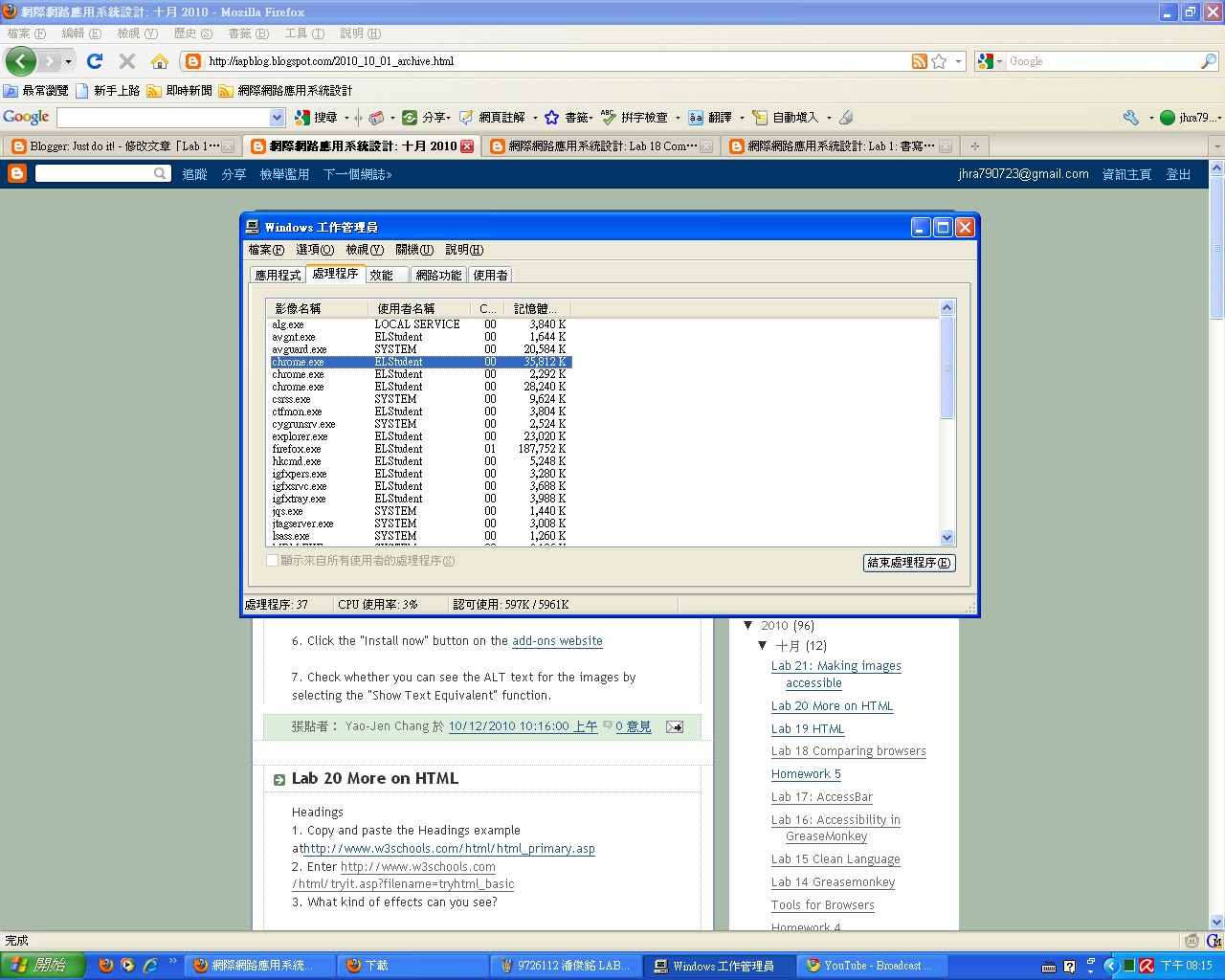
我很好奇的開了一下工作管理員,發現
chrome 好像分很多個工作在運作,firefox只有一個在運作,
可是把使用記憶體加一加,發現firefox好肥>"<

使用心得:
 chrome 速度比較快,在看youtube方面比firefox順暢多了,尤其是在學校,
 每當使用firefix要進入youtube看影音的時候,就會跑出
"您好,您可能已關閉 JavaScript,或者 Adobe Flash Player 的版本過舊。"
真的是很@$$%@#$@#@#$
不過使用chrome後,就不會有這種問題了^^

上面說的是針對 Adobe Flash Player 而已啦!
若真的要比的話啦,我覺得chrome給我的感覺比較輕便,不帶壓力。
firefox給我的感覺就有點沉重,可能是因為工作列比chrome多的緣故吧!